


@arizeai/openinference-tanstack-ai provides an OpenInference middleware for TanStack AI. It emits OpenTelemetry spans shaped according to the OpenInference specification so TanStack AI runs can be visualized in Phoenix.
This integration is brand new. If you run into issues or have ideas for improvements, please open an issue or discussion in the OpenInference repo.
Install
@arizeai/phoenix-otel:
Setup
Register your tracer provider before the middleware is applied so that spans are emitted to the configured exporter.- @arizeai/phoenix-otel
- Manual OpenTelemetry
Your instrumentation code should run before the middleware is applied. Import
instrumentation.ts at the top of your application’s entrypoint, or run with node --import ./instrumentation.ts index.ts.Usage
@arizeai/openinference-tanstack-ai exports openInferenceMiddleware, which plugs directly into TanStack AI’s middleware option. The middleware works for both streaming and non-streaming TanStack AI calls.
Chat With Tools
Tool calls are captured asTOOL spans nested under the corresponding LLM span. Here is a complete example using OpenAI and a single weather tool:
Custom Tracer
By default, the middleware uses the global tracer for this package. If your application already has a request-scoped or custom tracer, pass it explicitly:What Gets Traced
The middleware emits the following span structure for a TanStack AI run:- One
AGENTspan for the overallchat()invocation - One
LLMspan for each model turn - One
TOOLspan for each executed tool call
AGENTLLM 1TOOLLLM 2
AGENT span captures the top-level request and final response. The LLM spans capture provider/model metadata, input messages, output messages, tool definitions, and token counts. The TOOL spans capture tool names, arguments, outputs, and errors.
Observe
Once instrumented, all TanStack AI runs — including streaming calls, tool loops, and multi-turn conversations — show up in Phoenix with full input, output, and token detail.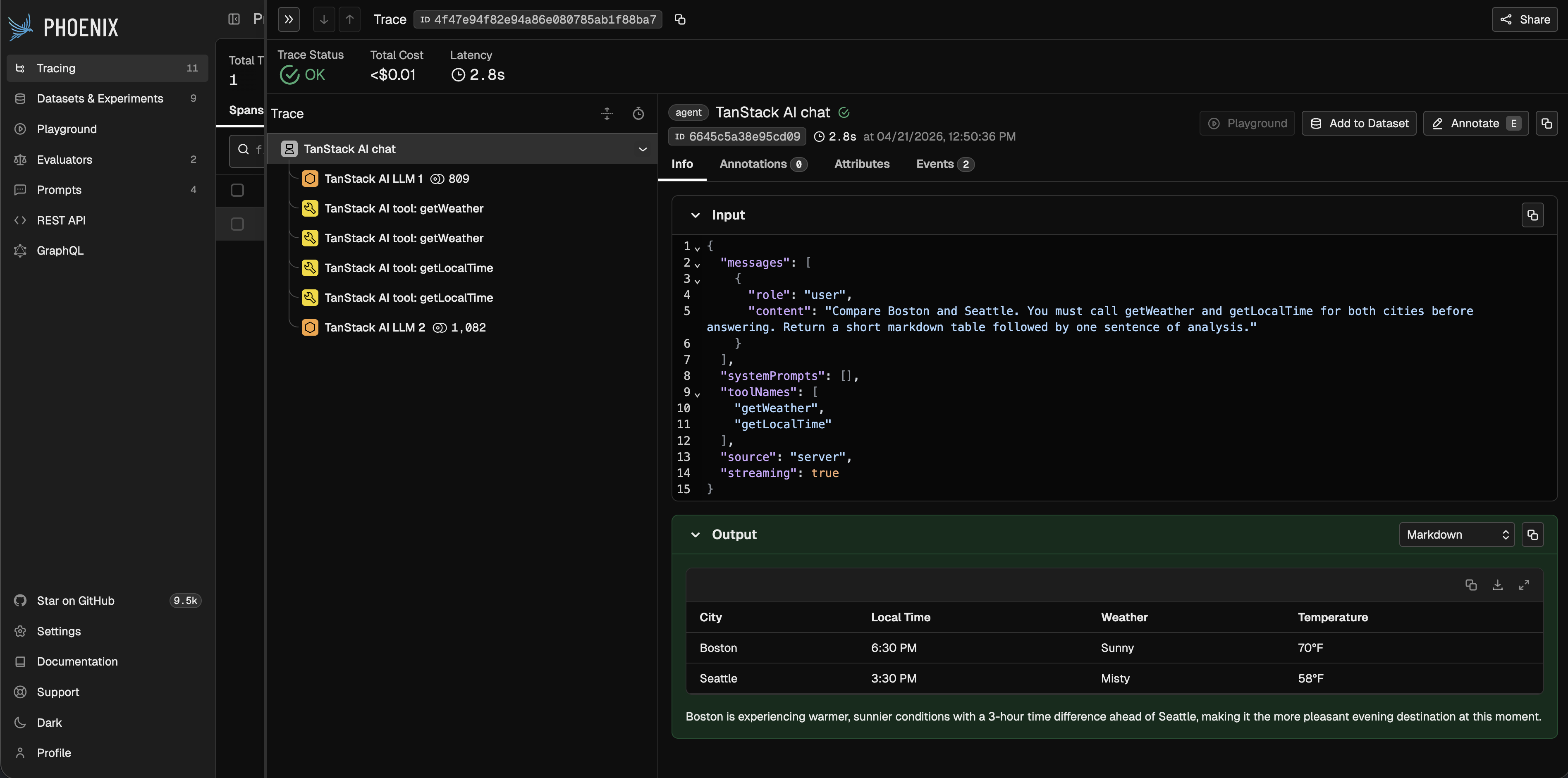
Notes
- This package is ESM-only because TanStack AI is ESM-only.
- The middleware works in both server and client environments, but client/server trace stitching depends on your application’s context propagation setup.